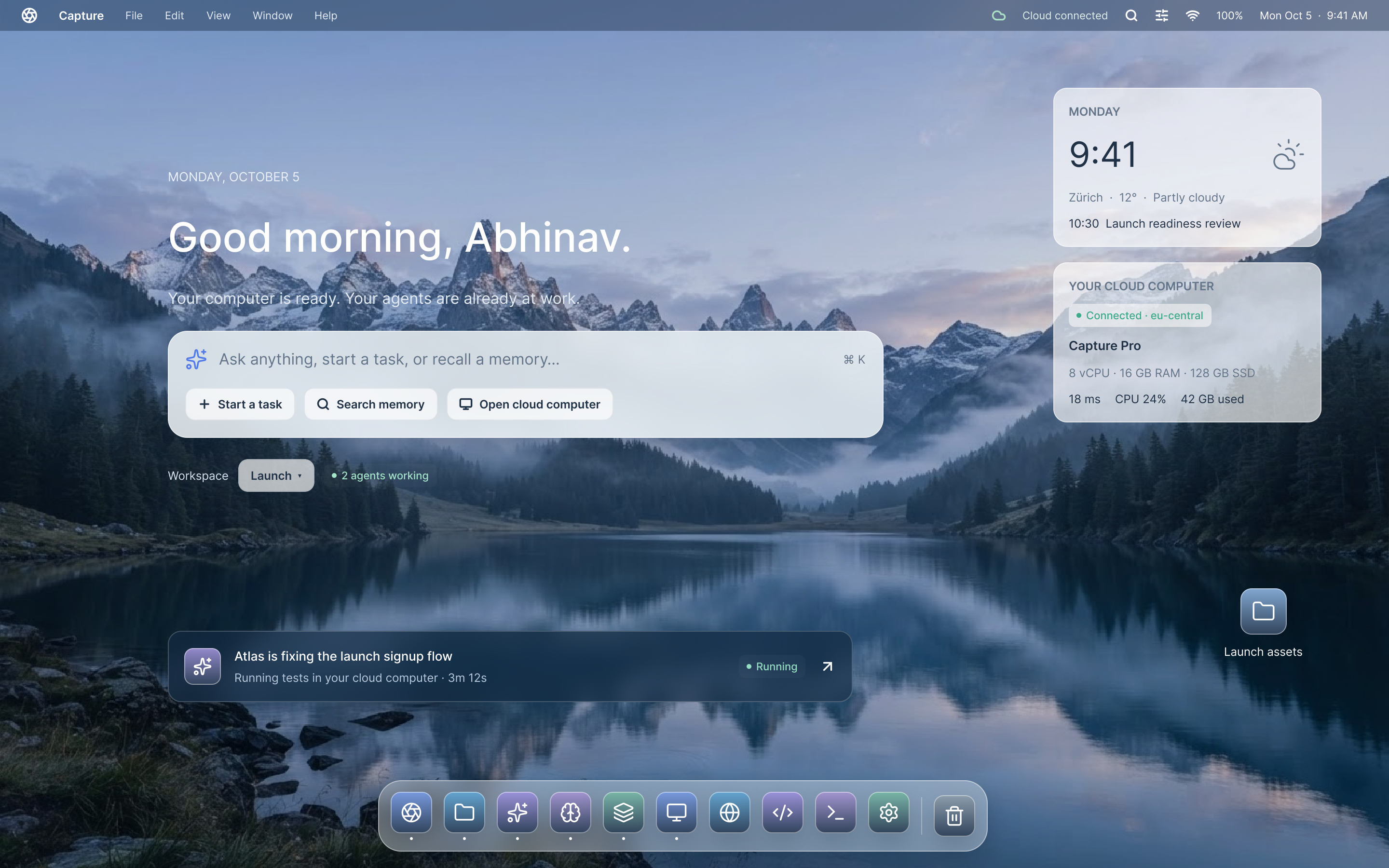
Your AI team, together in the cloud

A cloud desktop for
your AI agents.

A persistent cloud workspace where AI agents file, draft, research, and execute—while your laptop is closed.

Capture
File Edit View Window Help
Capture · 3 agents working in the cloud
9:41 AM
Capture Cloud Desktop
Model Context Protocol

Planned Integrations & Context Providers

Meet your new desktop

An agent desktop that stays out of your way.

Keep every app you use. Capture adds agents, files and memory that follow you from your laptop to the cloud and back.

Capture Cloud OS 2.4 File · Edit · View · Workspaces · Window · Help
● Live Motion Reel 32 GB RAM
Live Motion Reel · Multi-Agent Cloud Execution
The 5-Stage Architecture

How Capture powers your AI.

From hotkey ingestion to zero-gravity context memory and autonomous execution in cloud desktops.

01 / INGESTION

Collect via Hotkey & MCP

Press ⌘⇧C anywhere on your machine to save what you see. Never manually screenshot, download, or file tabs again. Injects directly into Capture with automated metadata extraction.

⌘ ⇧ C Try clicking keycaps
Universal Hotkey · Zero Manual Filing
02 / ORGANIZATION

Self-Sustaining Context Folders

Files, links, and memories organize themselves into Eden and QuietStudio Spaces. Hover or click the folder below to see zero-gravity memory particles float and collide using real Matter.js physics:

Zero-Gravity Matter.js Physics · Throw & Drag Notes
03 / PROACTIVE RECALL

Contradiction Resolution

When two documents conflict, Capture flags the disagreement instead of hallucinating.
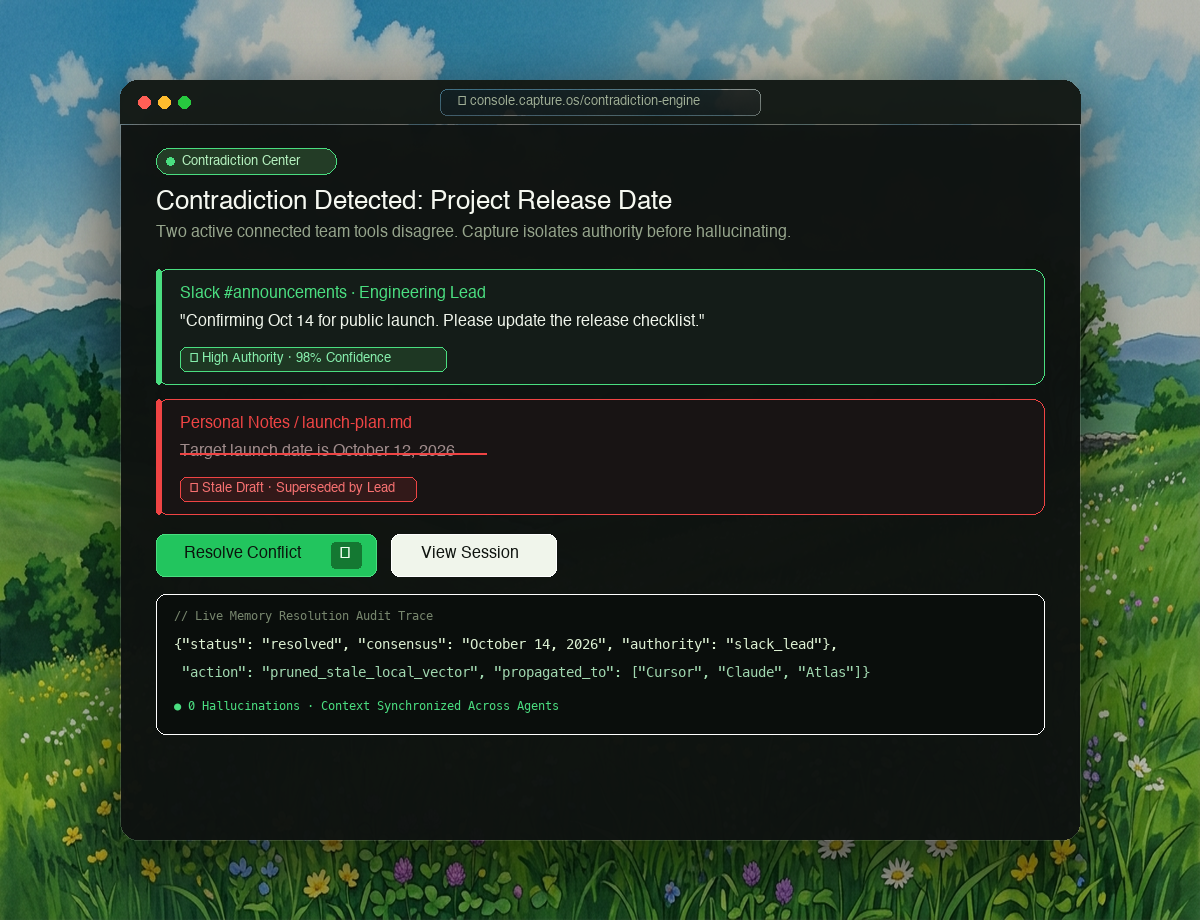
Capture Contradiction Resolution
Contradiction Center · Zero Hallucinations
04 / OPTIMIZED SERVE

Compact Context via MCP

Lightweight local models prune and structure memory before passing it to Cursor, Claude, or custom agents.

March
Desktop 237
Mobile 120
300 200 100 0 Jan Feb Mar Apr May Jun
Token Optimization · 74% Cost Reduction
05 / AGENTIC OS

QuietStudio Desktops

Describe a space in plain language. Capture launches cloud micro-desktops with native display drivers to run tests, drafts, and audits autonomously.
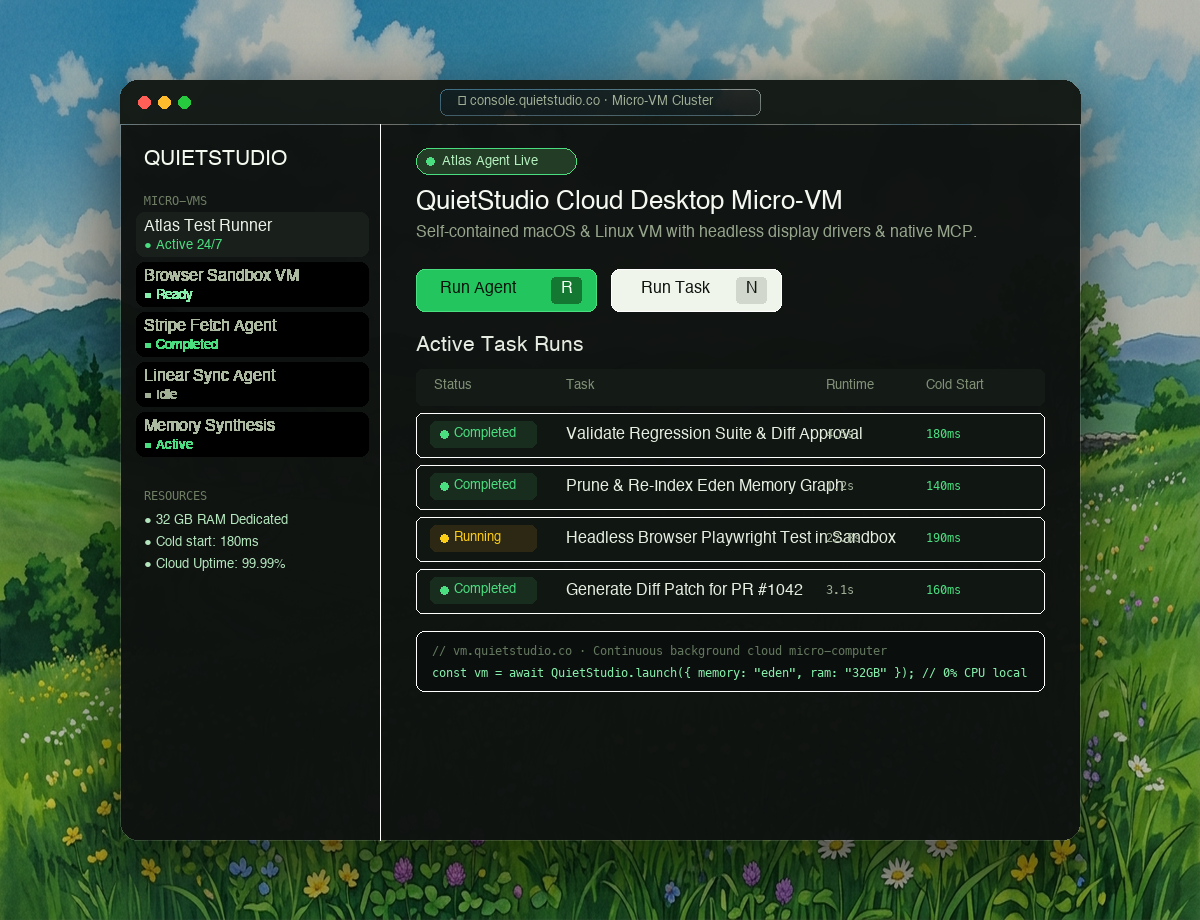
QuietStudio Cloud Desktop Micro-VMs
Micro-VM Sandboxes · Native CDP Drivers
Interactive OS Tour

Designed down to every pixel.

Explore the authentic screens of Capture designed in Figma—from live agent debugging to memory contradiction resolution.
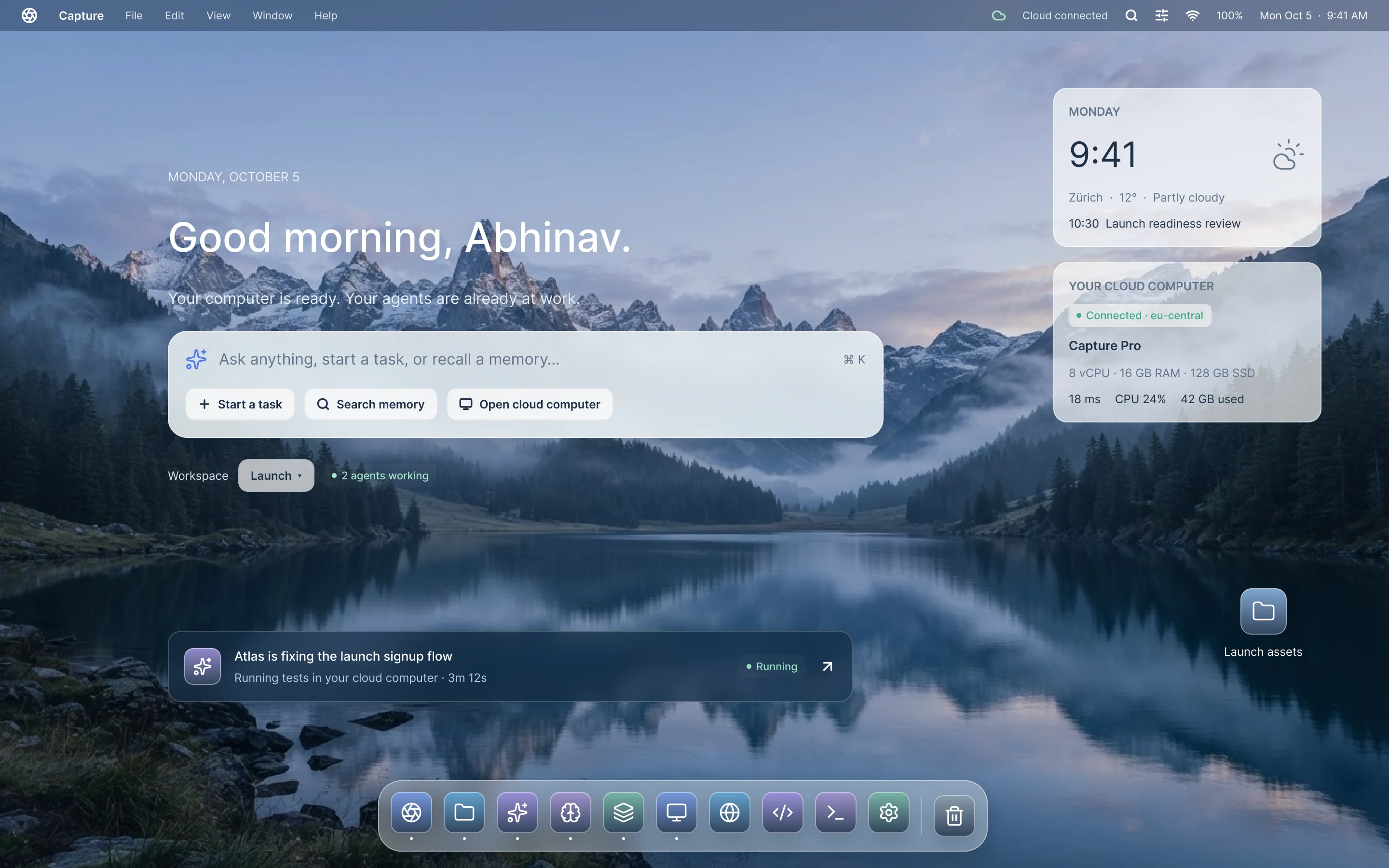
  • 1. Desktop — Clean Meadow The core Capture OS desktop with persistent menu bar and floating agent workspace.
  • 2. App Launcher — Full Modal Instant access to developer tools, browser VMs, editors, and agent pipelines.
  • 3. Mission Control — Workspaces Four continuous workspaces: Development, Research, Launch, and Personal.
  • 4. Universal Search — Memory Queries across Slack, Notion, and Drive with 98% confidence citation synthesis.
  • 5. Agents — Live Session Atlas actively fixes validation bugs, runs tests, and logs context in an isolated IDE.
  • 6. Tasks — Task Composer Define goals, select models, and configure sandboxed cloud execution with 1 click.
  • 7. Review — Diff Approval Visual diff with 33 passing tests and 1-click human approval before code lands.
  • 8. Memory — Contradiction Center Flags conflicting project dates across team tools instead of hallucinating.
  • 9. Spaces — Launch Environment Everything for the October 14 release: active agents, verified notes, and repos.
  • 10. Cloud Desktop — Micro-VM Full cloud computer with code editor, browser preview, and terminal running 24/7.
  • 11. Library — Integrations Zero-friction connectors for GitHub, Slack, Notion, Linear, and custom MCP servers.
  • 12. Inbox — Automations Self-organizing event stream and background triggers that keep you in sync.
  • 13. System Overlays — Focused View High-focus modal workspaces for deep coding sessions and model inspection.
  • 14. Settings — Files & Storage Full user control over encrypted memory, model access, and local vs cloud sync.
  • 15. Lock Screen — Cloud Continuity Shut your laptop lid. Your cloud desktop and agents continue running uninterrupted.
1. Desktop — Clean Meadow
1 / 15
2880 × 1800 Retina Full Res ↗
1. Desktop — Clean Meadow
The core Capture Cloud OS desktop with peaceful meadow backdrop, persistent menu bar, and floating agent windows. 16:10 Retina Display · PDF Master
Compare

From scattered tools to one desktop.

One continuous layer for your apps, files and agents—without leaving the tools you already rely on.

Without Capture

  • ✕ Context fragmented across Slack, Notion, Chrome, and local notes
  • ✕ Re-explaining prompt background instructions to chatbots every morning
  • ✕ AI agents hallucinate conflicting release dates and stale decisions
  • ✕ All execution halts the instant you close your laptop lid
Scattered Tabs Broken Context Manual Copy-Paste Hallucinations

With Capture

  • ✓ One cloud desktop where memory and apps live together permanently
  • ✓ Lightweight local pruning cuts frontier API token costs by 74%
  • ✓ Contradiction engine flags discrepancies between team documents
  • ✓ Agents execute continuously in sandboxed cloud micro-VMs 24/7
Capture Cloud OS Eden Spaces Source Authority 24/7 Execution
Developer SDK & MCP

Embed computer use in your product.

Spin up isolated cloud desktops in milliseconds with native CDP and computer-use APIs.

import capture

# Initialize persistent cloud desktop (< 200ms cold start)
desktop = capture.CloudDesktop(
    os="ubuntu-desktop",
    headless=False,
    region="us-east-1"
)

# Spawn an autonomous agent with computer-use permissions
agent = desktop.spawn_agent(model="claude-3-7-sonnet")

# Execute natural language desktop goals
result = agent.execute("""
    1. Open Chrome and inspect internal portal
    2. Extract Q3 revenue table to CSV
    3. Update executive Notion dashboard
""")

print(f"Task completed in: {result.duration}s")
[200ms] Sandboxed micro-VM initialized · CDP connected · Task verified with zero errors

Sub-200ms Cold Starts

Pre-warmed micro-VM clusters ensure agents begin executing instantaneously without waiting for cumbersome operating system boots.

Native CDP & Display Drivers

Full Chrome DevTools Protocol, virtual multi-monitors, and low-latency WebRTC live stream inspection built-in.

Human-In-The-Loop Safeguards

Triggers approval prompts via SMS, Slack, or in-app modal when an agent requests write permission or external spend.

Semantic Vector Mesh

Every word indexed by meaning.

Search throughout your entire universe of data based on what you remember—not just file names.

Try prompts:
Slack #pricing-sync — Oct 14 98.4% Semantic Match

"We agreed to grandfather existing Pro tier members at $24/seat, while new enterprise accounts starting November 1 receive the updated $39/seat rate."

Model Context Protocol (MCP) • Global Hotkey ⌘⇧C • Zero repetitive prompting • Self-Sustaining Context Folders • QuietStudio Micro-VMs
Moonlit cherry blossom valley
Join the waitlist

Your PC, extended.

Keep every app you use. Capture adds agents, files and memory that follow you from your laptop to the cloud and back.

Get updates as Capture takes shape.